Sunday, May 3, 2009

Silverlight Top 8 Frequently Asked Questions

Q. What is Silverlight Tool Kit?

Ans: To create an application or game you need to design, code and give some extra feature to your output. 

To do the above, you need some controls, IDE etc.

Silverlight Tool kit is nothing but is a collection of Silverlight Tools, Components etc. It includes source code describing the all you need to develop an application.

Please visit this link for more info:http://www.codeplex.com/Silverlight


Q. Can I add more than one .xaml pages in silverlight application?

Ans: Yes, you can have multiple .xaml files in a single project.

In the App.xaml, in the method Application_Startup you can choose, which page you want to initially display.


Q. How can I create image pieces/sub image?

Ans: In straight way you can''t create a subimage from an existing image. Here you just clip an image, Clipping is just different from Cropping. In clipping, first you have to dictate which part of the images to draw and later you have to remove all but the desired part of the image. Silverlight does not support cropping.


Q. How does Silverlight 2 differ from Adobe Flash?

Ans: As I am from .Net background so in my views you can get C# / Vb.net compiled code but in Flash there is only action script.

You can find difference in depth at : http://silverlight.net/forums/t/3015.aspx


Q. How can I switch to Expression Blend from Visual Studio?

Ans: Expression blend provide great extensibility for XAML files.To switch to Expression Blend, right-click on the XAML file and select Open in Expression Blend.


Q. What happened when I press F5 within Visual Studio to run Silverlight application?

Ans: When you run the Silverlight application within Visual Studio, a new folder created in the web-site project for silverlight solution and it happened only first time. The folder name is ClientBin and having package with XAP extension which contains compiled project.


Q. Can you elaborate how to start a silverlight application with Visual Studio?

Ans : You can find a fully described article from http://www.silverlightclub.com/resources/1858-silverlight-lets-start-building-applications.aspx.aspx

In the following step(s) I am giving the ideas all about:

1.Create a project:Here you just start your visual studio, Select your programming language [C#/VB], Choose Silverligh Template give the name and save it.

2. Adding SIlverlight COntrols:One thing is happened here, controls cannot dragged onto the designer, you can draw/drag the controls on XAML page.

(a) Naming to control:In this step just give the name to your silverligt control like for Button you can give name as : btnmySilverligtButton

(b)Adding event handlers to Silverlight controls:Here you can give the event handlers like for click etc.

(c)Testing Silverlight applications in Visual Studio:Now just press F5 and test your application


Q. What is the best place to start Silverlight application?

Ans: There is no hard and fast rule to start Silverlight application. Every developer can start as per his/her experience. like as per my case I always prefer Visual Studio. SO, in my view Visual Studio is the best place to start with Silverlight2 applications.Microsoft provides templates for creating Silverlight applications and libraries in C# and Visual Basic.

Microsoft TechEd-2009

Lets cheers, its a good news for all Microsoft lovers.
Microsoft TechEd2009 will be conducting in Hyderabad from May13 to May15.

Main attention of the eve is Steven A. Ballmer,CEO Microsoft. This is the greatest and biggest eve in India and expecting to see a huge crowd from developer community.

To grab more details please visit : Microsoft TechEd2009.

Activities of CodeDigest - May'2009

CodeDigest Article Digest

CodeDigest For the Month 5\2009

This Month Contest
Universal TV/VCR/DVD Remote Controller Watch with World Time
Contribution Required:4 articles or 6 code snippets
USB AA/AAA Battery Charger
Contribution Required:2 articles or 3 code snippets
Mini Pig 2 LEDs Flashlight White

Contribution Required:For Participation

New Articles Published
Edit,Update and Delete in GridView using DataKeys
Edit,Update and Delete in GridView using DataKeys,A datakey represents the primary key field or field of a record in a data-bound control. Many a times in our applications we use primary keys to get control of the particular record in the gridview. For this situation, many developers use invisible columns (Hidden columns) in the gridview to identify that row. We can achieve the same functionality using Datakeys.
Beginning Silverlight Development
Beginning Silverlight Development,Microsoft introduced Rich Internet Application with the introduction of Silverlight which is a very lightweight and a client-side application.
Better Practices on Building High Performance Web Pages
This article details out the better practices on how to get the most out of your web pages in terms of delivering, parsing and rendering the content on a web browser.
Optimizing Performance in WPF Applications
This article explains how to optimize your XAML markup to speed up your WPF applications.
How to perform WPF Data Binding using LINQ to XML
Most of the times, you may have to display XML data in your WPF applications. Traditionally, you might use XML plug-ins offered by ADO.NET. But, LINQ is the mantra now. Using LINQ to XML, it is much easier and fun to bind your WPF controls and perform data binding as a new fashion.
Using HyperLink Control in DataBound Controls
In this article, I will explain different ways of using hyperlink control in data bound controls like GridView,DataList and Repeater control.
How to skip SharePoint spell check for an input control
KwizCom's VP R&D Shai Petel makes complex SharePoint issues – simple. Here he explains how to skip SharePoint spell check for an input control.
Picasa Style Photo Album Using ListView Control in ASP.Net 3.5
ListView is a new databound control that is shipped with ASP.Net 3.5. Read my previous article - ListView Control in ASP.Net 3.5 which elaborates the usage of this new control. ListView control is one of the most flexible databound control that can be used to present the data in any custom format. Moving forward, in this article we will use this new control to create Google’s Picasa style photo album.
Building Collapsible Panel Control using jQuery in ASP.Net Page
It is a technique where we can provide expand/collapse feature to a section of page. Technically, it is nothing but providing expand/collapse feature to a DIV element. So, a page with lengthy content can make use of this feature to display only less content and show the full content on demand.
Single Button Click Custom Control
This article demonstrates a custom control for button which gets disabled after user clicks on it so that we can stop user to resubmit the same information again and again intentionally or unintentionally.
Here, when user clicks on submit button, its first checks the validation part. After passing it, the data gets posted & button gets disabled. After that the button gets enabled for new submission. Also the text written in the textbox gets changes dynamically.
Useful Tools for Web Developers
There are so many handy tools that we use in our day to day life to simplify our work. This article will list some of the useful tools that a webdeveloper should be aware.
Silverlight 2 Controls – Overview
In the present article we will learn something about the available Silverlight Controls.Silverlight Controls basically can be divided into: Layout Controls, Input Controls, Media Controls and Other Controls.
How to perform WPF Data Binding using LINQ to XML - Part 2
This article is a sequel to the previous artile that shows how to perform binding to inline XML data using XLINQ objects. In this part, we discuss how to bind to an XML file using XLINQ objects and details out a sample application.
Choosing the Right DataBound Control in ASP.Net
There are various databound controls available in ASP.Net to display data. For example: GridView, DataList, Repeater, ListView, etc. Whenever we get a requirement to display data, there is always a confusion to choose the right databound control that can satisfy our needs. This article will help you to understand all these controls and their advantage in a particular scenario which can help us to choose the right control that can fit our needs.

New Codes Published
WaterMark in ASP.Net TextBox using JavaScript
Encrypting/Decrypting Connection String in ASP.Net
Using RegisterClientScriptBlock() Methods of ClientScriptManager Class
Using RegisterStartupScript() Methods of ClientScriptManager Class
Using RegisterOnSubmitStatement() Method of of ClientScriptManager Class
Accessing Master Page Members from Content Pages in ASP.Net

New FAQs Published
What is jQuery? How to use it in ASP.Net Pages?
How to enable jQuery intellisense in Visual Studio 2008?
How to use jQuery intellisense in an external javascript file?
How to get image pieces in Silverlight2?
Can you elaborate how to start a silverlight application with Visual Studio?
How does Silverlight 2 differ from Adobe Flash?
What are virtual path providers?

Last Month Winners
Winner:balamurali balaji
1.5" LCD Rechargeable Digital USB Photo Frame Keychain (107-Picture Memory Storage)
Contribution Done:4 Articles Or 8 CodeSnippets
Winner:ph madala
Stylish Moonbeam Bedside Digital Clock
Contribution Done:3 Articles Or 6 CodeSnippets
Winner:balamurali balaji
LED keychain
Contribution Done:For Participation
Winner:Gaurav Arora
LED keychain
Contribution Done:For Participation

Wednesday, April 29, 2009

MVM from DotnetSpider.com

Its a very cool Morning today. I got a mail from Raghav , The webmaster of http//:dotnetspider.com regarding the Most Valuable Member award from Dotnetspider. This is the moment of my dreams come true. Here are the few lines from the mail :

Congratulations from dotnetspider.com! Your contributions to the technology world is recognized by dotnetspider.com, one of the most respected technology community. We are glad to inform you that you are selected as the MOST VALUABLE MEMBER (MVM) for your active participation and contribution to dotnetspider.com. You will be awarded with a certificate of appreciation from us.Visit this page for the list of winners - http://www.dotnetspider.com/credits/Index.aspx

My thanks to DNS family for this award and special thanks to Raghav who have nominated me for this prestigious award.

Saturday, April 18, 2009

Became The Webmaster from a Member

Today I want to share my words of Journey with DNS from a Member to a Webmaster.

My journey with DNS is started on 7/19/2008 5:11:57 PM. I have registered with Dotnetspider.com a MicroSoft.Net community as a new member with profile Gaurav Arora 

As I was a very new in this community site I was not aware from rules/regulations also, “to err is human” so, its natural that I did mistakes. I am technical and know how to do Techie stuffs but not aware from the right way. In this period I have met many diamond members and other Sr. members who guided me "How to present stuffs in DNS?".

I met with Raghav he guided me lot of stuffs. As time passed away I got matured in DNS and Raghav found me suitable for Editorial work and he selected me as an Editor for DNS. This is the truning point of my life in DNS. Afterwards, Admins of DNS selected me Senior Editor.  

Now I became a Diamond member and a Webmaster of DNS

Its just start of my Jorney, Tony who found me suitable for my work so, he gave me another responsibility of his another site Silverlight Club as a Webmaster

I am still trying to do my more efforts to prove myself also still learning more stuff.


The journey is still continue... 


Friday, April 17, 2009

Silverlight Games Site - Silverlight Club

Its a great day for me, on 01st April'2009 finally Silverlight Game Site launched.

The main motive of Silverlight Club is to promote Microsoft Silverlight . Tony John is the Founder and Admin of the Site. I am taking as a Webmaster of the site.

We are looking some good Silverlight Experts , also we are running a Contest on the Site for Silverlight Games.

Wednesday, March 25, 2009

MicroSoft Released - Silverlight 3- Beta

MicroSoft Released - Silverlight 3- Beta

MicroSoft Released its Silverlight3 beta in MIX [conference for designers and developers at Las Vegas].

Its available for download at:

1. MicroSOft Silverlight 3 SDK Beta 1
2. MicroSoft Silverlight 3 Tools Beta 1 for Visual Studio 2008 SP1
3. The MicroSoft 3 beta Runtime

Sunday, February 22, 2009

How to create ASPX Page Dynamically - A Step Ahead Series?

Introduction


In a simple creating an aspx page dynamically is a very tedious job. Whenever we think for dynamically creation scenarios stuck in mind about the overload to server etc. But with the help of this article one can attain the same as easily as creating another simple aspx page.

Need and Requirement


Now next words came to mind that what is the need to create an aspx page dynamically? Let me explain it:


  1. You need to create a page, based on selected requirement at the moment.

  2. Need to create a page from static html contents.

  3. Having huge data, need to represent in an individual page and its tough to store in database.


Article Scenario


As stated above, I choose a scenario where you are running a technical community and need to the template where member of your site will able to write some static html contents.

Explanation


For the same we need following pages:
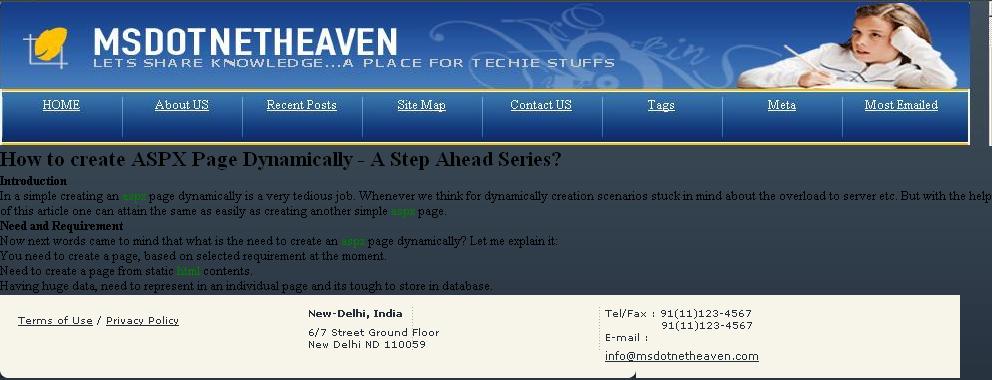
1. PageHeader.ascx
This contains the header information of your page like LOGO etc.


<%@ Control Language="C#" AutoEventWireup="true" CodeFile="PageHeader.ascx.cs" Inherits="myTemplates_PageHeader" %>
<link href="../style.css" rel="stylesheet" type="text/css" />
<div>
<asp:PlaceHolder ID ="plhImage" runat="server" />
<ul class="menu">
<li><a href="./default.aspx">HOME</a></li>
<li><a href="./default.aspx">About US</a></li>
<li><a href="./default.aspx">Recent Posts</a></li>
<li><a href="./default.aspx">Site Map</a></li>
<li><a href="./default.aspx">Contact US</a></li>
<li><a href="./default.aspx">Tags</a></li>
<li><a href="./default.aspx">Meta</a></li>
<li><a href="./default.aspx">Most Emailed</a></li>
</ul>
</div>


2. PageFooter.ascx
Obvious it contains the Footer information.


<%@ Control Language="C#" AutoEventWireup="true" CodeFile="PageFooter.ascx.cs" Inherits="myTemplates_PageFooter" %>
<link href="../style.css" rel="stylesheet" type="text/css" />
<div id="footer">
<div>
<a href="http://www.webdesign.org">Web Design</a> by <a href="http://www.freetemplatesonline.com">Free Templates</a> Online<br />
<a href="#">Terms of Use</a> / <a href="#">Privacy Policy</a>
</div>
<div class="centeral-block">
<strong>New-York, USA</strong>
11 Some Street Second Floor<br /> New York WA 02020
</div>
<div>
Tel/Fax : 1(800)123-4567<br />
              1(800)123-1234<br />
E-mail : <a href="#" id="mail">info@yourcompany.com</a>
</div>
</div>

Click to check Snapshot

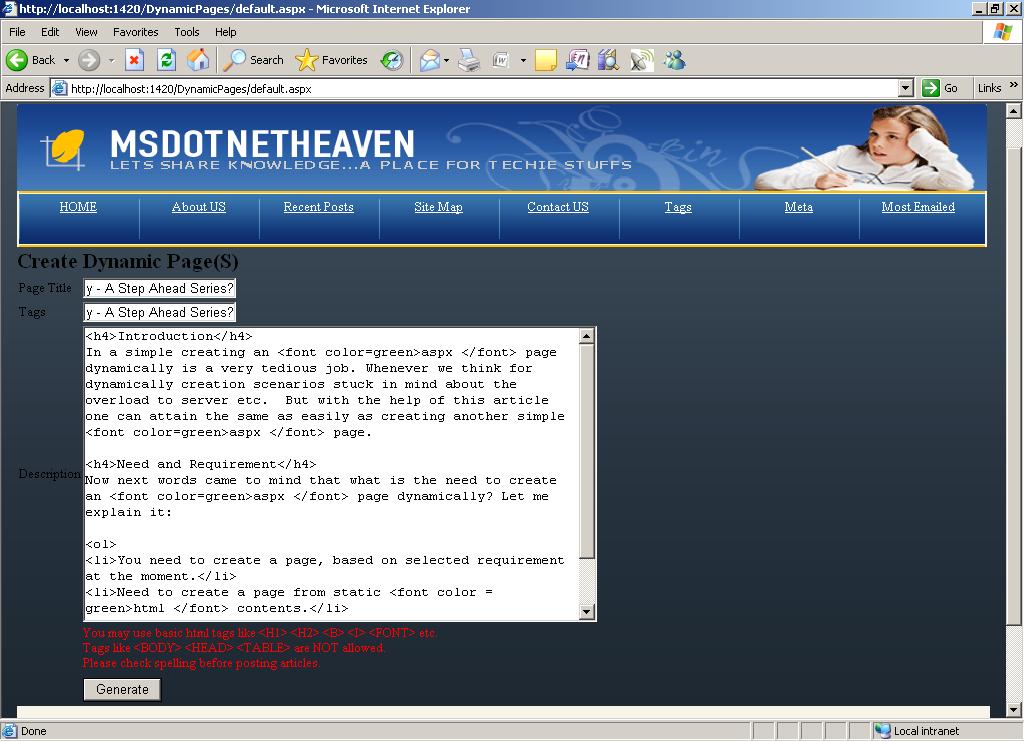
3. createPage.ascx
Definitely this is the main page, it just create a skeleton as per the above requirement and then segregate the contents and make the title.


<%@ Control Language="C#" AutoEventWireup="true" CodeFile="createPage.ascx.cs" Inherits="myTemplates_createPage" %>
<div>
<table>
<tr>
<td style="width: 100px">
Page Title
</td>
<td style="width: 100px">
<asp:TextBox ID="txtTitle" runat="server"></asp:TextBox>
</td>
</tr>
<tr>
<td style="width: 100px">
Tags
</td>
<td style="width: 100px">
<asp:TextBox ID="txtTags" runat="server"></asp:TextBox>
</td>
</tr>
<tr>
<td style="width: 100px">
Description
</td>
<td style="width: 100px">
<asp:TextBox ID="txtContent" runat="server" Height="292px" TextMode="MultiLine" Width="510px"></asp:TextBox>
</td>
</tr>
<tr>
<td style="width: 100px">
</td>
<td style="width: 100%">
<ul>
<li><font color="red">You may use basic html tags like <H1> <H2> <B>
<I> <FONT> etc. </font></li>
<li><font color="red">Tags like <BODY> <HEAD> <TABLE> are NOT allowed.</font></li>
<li><font color="red">Please check spelling before posting articles.</font></li>
</ul>
</td>
</tr>
<tr>
<td style="width: 100px">
</td>
<td style="width: 100px">
<asp:Label ID="lblMessage" runat="server"></asp:Label>
</td>
</tr>
<tr>
<td style="width: 100px">
</td>
<td style="width: 100%">
<asp:LinkButton ID="lnkNewPage" OnClick="lnkNewPage_Click" runat="server"></asp:LinkButton>
</td>
</tr>
<tr>
<td style="width: 100px">
</td>
<td style="width: 100px">
<asp:Button ID="btnGenerate" runat="server" OnClick="btnGenerate_Click" Text="Generate" />
</td>
</tr>
</table>
</div>


Click to check Snapshot

4. Default.aspx
This is the page or container which contains above all 3-controls.


<%@ Page Language="C#" AutoEventWireup="true" CodeFile="Default.aspx.cs" Inherits="_Default" ValidateRequest="false" %>

<%@ Register TagPrefix="myPage" TagName="aspxPage" Src="~/myTemplates/createPage.ascx" %>
<%@ Register TagPrefix="myPageHeader" TagName="PgHeader" Src="~/myTemplates/PageHeader.ascx" %>
<%@ Register TagPrefix="myPageFooter" TagName="PgFooter" Src="~/myTemplates/PageFooter.ascx" %>
<!DOCTYPE html PUBLIC "-//W3C//DTD XHTML 1.0 Transitional//EN" "http://www.w3.org/TR/xhtml1/DTD/xhtml1-transitional.dtd">
<html xmlns="http://www.w3.org/1999/xhtml">
<head runat="server">
<title></title>
<link href="style.css" rel="stylesheet" type="text/css" />
</head>
<body>
<form id="form1" runat="server">
<div>
<table width="100%">
<tr>
<td colspan="2">
<myPageHeader:PgHeader ID="PgHeader1" runat="server" />
</td>
</tr>
<tr>
<td>
<h2>
Create Dynamic Page(S)</h2>
</td>
</tr>
<tr>
<td colspan="2">
<myPage:aspxPage ID="asxPage1" runat="server" />
</td>
</tr>
<tr>
<td colspan="2">
<myPageFooter:PgFooter ID="PgFooter1" runat="server" />
</td>
</tr>
</table>
</div>
</form>
</body>
</html>


5. myPageTemplate.tmp
This is the template page for all pages

<%@ Page Language="C#" CodeFileBaseClass="PageBase" AutoEventWireup="true" CodeFile ="myPageCode.cs"
Inherits= "myPageCode" PageID="[ID]" MetaTitle="[MetaTitle]" MetaKeywords="[MetaKeywords]" %>
<%@ Register TagPrefix="myPageHeader" TagName="PgHeader" Src="~/myTemplates/PageHeader.ascx" %>
<%@ Register TagPrefix="myPageFooter" TagName="PgFooter" Src="~/myTemplates/PageFooter.ascx" %>

<html xmlns="http://www.w3.org/1999/xhtml">
<head runat="server">
<title></title>
<link href="style.css" rel="stylesheet" type="text/css" />
</head>
<body>
<form id="form1" runat="server">
<div>
<table width="100%">
<tr>
<td colspan="2">
<myPageHeader:PgHeader ID="PgHeader1" runat="server" />
</td>
</tr>
<tr>
<td>
<h2>
<%=MetaTitle%></h2>
</td>
</tr>
<tr class=content>
<td colspan="2">
[PageContent]
</td>
</tr>
<tr>
<td colspan="2">
<myPageFooter:PgFooter ID="PgFooter1" runat="server" />
</td>
</tr>
</table>
</div>
</form>
</body>
</html>


6. myPageCode.cs
A common code-behind page for all dynamic pages


using System;
using System.Data;
using System.Configuration;
using System.Collections;
using System.Web;
using System.Web.Security;
using System.Web.UI;
using System.Web.UI.WebControls;
using System.Web.UI.WebControls.WebParts;
using System.Web.UI.HtmlControls;

public partial class myPageCode : PageBase
{
public String newPageID
{
get
{
if (ViewState["newPageID"] != null)
return Convert.ToString(ViewState["newPageID"]);
else
return "0";
}
set
{
ViewState["newPageID"] = value;
}
}
protected void Page_Load(object sender, EventArgs e)
{
base.PageID = this.newPageID;
}

}

7. PageBase.cs
A pagebase which inherits System.Web.UI.Page.

using System;
using System.Collections.Generic;
using System.Web;
using System.Data;
using System.Configuration;
using System.Web.Security;
using System.Web.UI;
using System.Web.UI.WebControls;
using System.Web.UI.WebControls.WebParts;
using System.Web.UI.HtmlControls;

///
/// Summary description for PageBase
///

public class PageBase : System.Web.UI.Page
{
public PageBase()
{
//
// TODO: Add constructor logic here
//
}
#region Properties
public String PageID
{
get
{
if (ViewState["PageID"] != null)
return Convert.ToString(ViewState["PageID"]);
else
return "0";
}
set
{
ViewState["PageID"] = value;
}
}
public String MetaTitle
{
get
{
if (ViewState["MetaTitle"] != null)
return Convert.ToString(ViewState["MetaTitle"]);
else
return "No Title";
}
set
{
ViewState["MetaTitle"] = value;
}
}
public String MetaKeywords
{
get
{
if (ViewState["MetaKeywords"] != null)
return Convert.ToString(ViewState["MetaKeywords"]);
else
return "No Keywords";
}
set
{
ViewState["MetaKeywords"] = value;
}
}
#endregion

protected override void OnLoad(EventArgs e)
{
if (!String.IsNullOrEmpty(MetaTitle))
{
HtmlMeta Title = new HtmlMeta();
Title.Name = "Title";
Title.Content = this.MetaTitle;
this.Header.Controls.Add(Title);
}

if (!String.IsNullOrEmpty(MetaKeywords))
{
HtmlMeta Keyword = new HtmlMeta();
Keyword.Name = "Keywords";
Keyword.Content = this.MetaKeywords;
this.Header.Controls.Add(Keyword);
}

//overide base
base.OnLoad(e);
}

void Page_Error(object sender, EventArgs e)
{
//Write Some logic here
}
}


Important


  1. Please note that I don’t check for any validation

  2. Instead of the use of Custom Control you can use Master Pages too.

  3. The same will create a good facility while you need to create dynamic pages.


How to run attached code:

1. Download the zip file
2. Open your Visual Studio2008
3. Open WebProject select the specific folder
4. Press F5 and enjoy

Your suggestions are invited to improve this.

Saturday, February 14, 2009

What are constructors in C# - A Step Ahead Series?

Introduction


In a simple words Constructor is nothing but a method, a special kind of method of a class, which gets executed when its (class) object is created.

Now, let’s take above in broader sense, A constructor is a class method automatically executed whenever class’s object is created or whenever class is initialized. Consider following bit of code:


public class MsDotNetHeaven
{
public MsDotNetHeaven()
{
//A default Constructor
}

//Class members

}


In above snippet, try to change the name of constructor from MsDotNetHeaven to MsDotNetMentor and see whats happen, you have to put same name as you gave it to class.

Behind the scenes:

What happened behind the scenes : whenever you try to create an object of class or initialize a class, then the default constructor is invoked.


//Initializes the Class
MsDotNetHeaven objMsDnH = new MsDotNetHeaven();


Types of Constructor


This is a n issue of debate but I always like to segregated Constructors in following types:


  1. Default Constructor

  2. A constructor that takes no parameters is called a default constructor. Default constructors are invoked whenever an object is instantiated by using the new operator and no arguments are provided to new.

  3. Parameterized Constructor

  4. Besides a default constructor when its need to pass some argument on the initialization of a class a parameterized constructor is come to picture. It follows the same rules as default constructor with a difference that it has some parameters which also differentiate it from default constructor. Go through following snippet:


    public class MsDotNetHeaven
    {
    public MsDotNetHeaven()
    {
    //A default Constructor
    }

    public MsDotNetHeaven(String strName)
    {
    //A parameterized Constructor having one parameter
    }

    public MsDotNetHeaven(String strFirstName, String strLastName)
    {
    //A parameterized Constructor having two parameters
    }


    //Class members

    }


    Note:
    1. A default constructor should be explicitly declared while declaring parameterized constructor.

    2. Some writer also take Private constructor and Static Constructor as types of constructor but in my view these are constructor with different modifiers so behave differ; I will cover these in next section.


Access Modifiers and Prefix with Constructors


By default Constructors are public but we can also use other modifiers and prefix like private and static. With the use of these modifiers constructors behave differently:

Using Access Modifier private with Constructor

When put private as access modifier to constructor then that constructor is known as private Constructor

A private constructor is a special instance constructor. It is commonly used in classes that contain static members only. If a class has one or more private constructors and no public constructors, then other classes (except nested classes) are not allowed to create instances of this class.

Some time there is a need where we have not allow outer world to get instantiate our class then we need to use private modifier with constructor. Consider following piece of code:


public class MsDotNetHeaven
{
private MsDotNetHeaven()
{
//A default Constructor as private
}

//Class members

}


Now, whenever you try to invoke following piece of code:


//Initializes the Class
MsDotNetHeaven objMsDnH = new MsDotNetHeaven();


it throws an error: Constructors. MsDotNetHeaven. MsDotNetHeaven ()' is inaccessible due to its protection level

Now, question comes to mind if the above contains error then what the use is of private constructor, we can make above class to be initialized by declaring another public constructor, modify above code-snippet with bellow one:


public class MsDotNetHeaven
{
private MsDotNetHeaven()
{
//A default Constructor as private
}
public MsDotNetHeaven(String strName): this()
{
//A parameterized Constructor having one parameter
System.Console.WriteLine(“My name is : “ + strName);
}

//Class members
}


Now, you can initialize class as follow:


//Initializes the Class
MsDotNetHeaven objMsDnH = new MsDotNetHeaven(“Gaurav Arora”);


Using prefix static with Constructor

With the use of static with constructor gives a name as static constructor

For C++ developers it’s a new concept introduced in C#.

A static constructor is used to initialize any static data, or to perform a particular action that needs performed once only. It is called automatically before the first instance is created or any static members are referenced.
Consider the following:


public class MsDotNetHeaven
{
static MsDotNetHeaven()
{
//A static Constructor
// Can only access static members here.

System.Console.WriteLine("I am a static constructor.");
}

//Class members

}


Now whenever you create an instance of the class MsDotNetHeaven the line I am a static constructor get printed.

Consider following piece of code:


public class MsDotNetHeaven
{
static MsDotNetHeaven()
{
//A static Constructor
// Can only access static members here.

System.Console.WriteLine("I am a static constructor.");
}

public MsDotNetHeaven()
{
//A default Constructor
}

//Class members

}


Above code is perfectly alright and will perform same result as earlier code.

Calling Parent Class Constructors in child class during inheritance


Now, suppose a scenario when you are inheriting a class and want to use Parent class constructor then how to attain that.

Simple the same has been achieved by using base()
Consider following code-snippet


public class MsDotNetHeaven
{
public MsDotNetHeaven()
{
//A default Constructor
}

public MsDotNetHeaven(String strName)
{
//A parameterized Constructor having one parameter
}

//Class members

}

public class MsDotNetMentor : MsDotNetHeaven
{
public MsDotNetMentor ()
{
//A default Constructor
}

public MsDotNetMentor (String strName) : base(strName)
{
//A parameterized Constructor having one parameter
}

//Class members

static void Main()
{
MsDotNetMentor objMsDnM = new MsDotNetMentor(); //(A)
MsDotNetMentor objNameMsDnM = new MsDotNetMentor(“Gaurav Arora”); //(B)
}


}


(A) From above : the sequence of invoking a constructor is first public MsDotNetHeaven() and then public MsDotNetMentor()
(B) From above : the sequence of invoking a constructor is public MsDotNetHeaven(String strName)and then public MsDotNetMentor(String strName)

Note:

  1. A static constructor should not be declared with any access modifier.

  2. A static constructor does not accept parameters

  3. A static constructor is called automatically.

  4. There is no way to call a static constructor directly.

  5. Can’t stop the execution of Static constructor


Due to the scope of this article it might be possible that something I forgot please remind me if any :

Important :

  1. Constructor is nothing but a special method, which initializes the class or its task to initialize the object of it class.

  2. Its name must be same as the name of class

  3. This is a special method as constructors do not have return types, not even void

  4. Constructor cannot return any value because they didn’t have any return type.

  5. Constructor can’t be get inherited, although a derived class can class the base class constructor.

  6. A class has atleast one constructor also known as default constructor [a constructor without parameter]

  7. You have to explicitly write a default constructor while Overloading constructors.

  8. Concept declaring multiple constructors of a class with different sets of parameters known as Constructor overloading.

  9. A constructor can be called another constructor using this()

Tuesday, February 10, 2009

LINQ Querry : A Step Ahead Series

LINQ Querry : A Step Ahead Series
History:
The article is related to previous posts :

1. Anonymous Types in LINQ: A Step Ahead Series

2. How to Test Anonymous Type Equality - LINQ: A Step Ahead Series

Introduction:

LINQ - Language Integreted Query is repeadily used in these days. The presented article is elaborate the idea "How to describe a LINQ Query".

Simply, a query is an expression that retrieves data from a data source.

Scope:
The scope of the presented article is upto its title and projected scenarios.
  • Basics

  • LINQ Actions

  • Some basic example

  • Creating a LINQ project using Visual Studio


Description:

Now lets elaborate the topic in following points:

1. Operation of LINQ Query:

LINQ query consists three distinct actions as defined bellow:

(a) In this step LINQ gather the DataSource it may be any source of data.
(b) In next step have to create the Query
(c) Finally, execute the Query.

Lest, go through the following code-lines and try to understand the above operations:


class LINQQuery
{
static void Main()
{

// This is the Data source - Operation - I
int[] numbers = new int[7] { 0, 1, 2, 3, 4, 5, 6 };

// Query Creation - Operation - II
var numQuery =
from num in numbers
where (num % 2) == 0
select num;

// Query Execution - Operation - III
foreach (int num in numQuery)
{
Console.Write("{0,1} ", num);
}
}
}


Three actions of LINQ Query [adapted from MSDN - bb397906]
LINQ Query Actions

2. Skip and Take:

Skip, SkipWhile, Take, and TakeWhile are used to partition collectionsinto two parts and then return one of the parts. These partition features are only implemented as extension methods.

skip jumps to the indicated argument position in the sequence and returns everything after that.

SkipWhile accepts a predicate and instead of using a position, it skips until the predicate evaluates to false.

Take grabs all of the elements up to the specified position in the index.

TakeWhile grabs all of the items in a sequence as long as the predicate evaluates to true.

3. Create a LINQ Project:

As per MSDN :

To use LINQ to XML or LINQ to DataSet in either C# or VB.Net language, you must manually add namespaces and references as described in the following :

If you are upgrading a project that you created by using an earlier version of Visual Studio, you may have to supply these or other LINQ -related references manually and also manually set the project to target .NET Framework version 3.5.

To target the .NET Framework version 3.5


  1. In Visual Studio, open a Visual Basic or C# project that was created in Visual Studio 2005 and follow the prompts to

    convert it to a Visual Studio 2008 project.

  2. For a C# project, click the Project menu, and then click Properties.

  3. In the Application property page, select .NET Framework 3.5 in the Target Framework drop-down list.

  4. For a Visual Basic project, click the Project menu, and then click Properties.

  5. In the Compile property page, click Advanced Compile Options and then select .NET Framework 3.5 in the Target Framework

    (all configurations) drop-down list.


Important Points:

  1. LINQ queries start with the keyword from.

  2. In a LINQ query, you are always working with objects.

  3. You an apply the basic operations to LINQ Query as follow:


    • Filtering is the common operation tyhrough which you can filter the data, consider following code:


      //filter all employees on last name as 'Arora'
      var lnqueryNames = from empname in employee
      where empname.lastname == "Arora"
      select empname;


    • Ordering sets the ordering for the output, lets take a loon in the following:


      //display all Arora in ascending order with departments
      var lnqueryNames = from empname in employee
      where empname.lastname == "Arora"
      orderby empname.dept ascending
      select empname;


    • Ordering give the output in a group, consider following example:


      var lnqueryNames = from empname in employee
      group empname by empname.department;

      foreach (var empbydept in lnqueryNames)
      {
      Console.WriteLine(empbydept.Key);
      foreach (Employee emp in empbydept)
      {
      Console.WriteLine(" {0}", emp.lastName);
      }
      }

Monday, February 9, 2009

How to Test Anonymous Type Equality - LINQ: A Step Ahead Series

How to Test Anonymous Type Equality - LINQ: A Step Ahead Series

First of all Anonymous Type Equality : If two or more anonymous types have same order, number and member declaratory type amd name then the same anonymous type is defined. So, its permissible to use the referencial equality operator on these types.

Now lets see the other face of the coin means of any of order, number and member declarator type and name is different then different anonymous type is defined for each. Then it throw compiler error while testing referential integrity.

Note:

  • Here you can use reflection to get the type information of anonymous types.

  • Use the Equals method (defined by all objects) to test equality of members.


Lets go through following lines :

var paternalMember = new {Father = "R k Arora", City = "Nangal Dam"};
var maternalMember = new {Mother = "Santosh Arora", City = "New Delhi"};

var fatherHome = new {Father = "R k Arora", City = "Nangal Dam"};
var motherHome = new {City = "New Delhi", Mother = "Santosh Arora"};

//Compare member equality:
paternalMember.Equals(fatherHome); //returns true
paternalMember.Equals(fatherHome); //error


If you want to know more about Anonymous Type-LINQ please refer to Anonymous Types in LINQ : A Step Ahead Series

Friday, February 6, 2009

Anonymous Types in LINQ : A Step Ahead Series

Introduction:

Programers of Visual Basic the keyword 'var' is confusing here as the type variants was used in Visual Basic.

Here, the keyword var tells to compiler emit a strong type based on t5e value of the operation on the right side.

Important:
Anonymous types can be used to initialize simple types like integers and strings.

Rules : Following are the some basic rules to use LINQ Anonymous Types.


  • Anonymous types can't be null.

  • Must always have an initial assignment.

  • Can be used with Simple or complex types, but composite anonymous types require member declaration

    example:
    var mylist = new {Topic="Anonymous-Types" [, declaratory = value, ...]}.

    in above Topic is the member declaratory.

  • Supports intelliSense.

  • Cannot be used for class field.

  • Can be used with arrays.

  • Anonymous types are all derived from the Object type.


Now, lets explore some category or types of anonymous types:

Simple Anonymous Type

With the keyword var and giving the value of the variable in the right side of the assignment operator (=), anyone can declare the Simple anonymous type.

var list = "Anonymous Types in LINQ : A Step Ahead Series";


The anonymous type is assigned to the name on the left side of the assignment operator, and the type emitted by the compiler to Microsoft Intermediate Language (MSIL) is determined by the right side of the operator.

The above line is identical in the MSIL if defined as following:

var list = "Anonymous Types in LINQ : A Step Ahead Series";


Array Initializer Syntax

Anyone can use the Anonymous Type to initialize the array too but with a rigid rule that is : new keyword must have to use.

example:

var myArrayWithAntype = new int[]{ 1, 2, 12, 53, 58, 8, 2113, 2221 };


In above the array is Anonymous as it is defined with Annonymous Type initialize rule.

Composite Anonymous Types : Lets define

Now, lets take a look how to define Composite Anonymous Type. Its called just as class without the "typed" class definition.

var fullname = new {FirstName=”Gaurav”, LastName=”Arora”};


in above 'fullname' contains both first and last name. Go through following:


//throws an error
Console.WriteLine(fullname.FirstName);

//Displays fullname
Console.WriteLine(fullname);


Note :
1. Anonymous types are immutable.
2. Within the scope of article we have supplied a little tricks, there can be generic anonymous methods, you can apply methods, can return anonymous values etc.

Friday, January 30, 2009

State Management : A Step ahead series

State Management


The State or Cache Management is nothing but the way to storing the data in Client-Side and in Server-Side using preity small memory.
There are two major category of the above :

I. Server-Side State Management

Session State:

Its nothing but defined as a period of time shared between the web application and user. Every user has individual session. Items/Objects can be placed into the Session which would only define these object for that user. Session contains key variables which help to identify the related values. This can be thought of as a hash table. Each user would represent a different key node in the hash identifying unique values. The Session variables will be clear by the application which can clear it, as well as through the timeout property in the web config file. Usually the timeout is 20 minutes by default.

Session Variables are stored on the server, can hold any type of data including references, they are similar to global variables in a windows application and use HTTP cookies to store a key with which to locate user's session variables.

The collection of session variables is indexed by the name of the variable or by an integer index. Session variables are created by referring to the session variable by name. You do not have to declare a session variable or explicitly add it to the collection.

Lets get it cleared from following example:

Session[“firstName”] = “Gaurav” //User’s first name
Session[“lastName”] = “Arora” //User’s last name

// Clear the session variable
Session[“FirstName”] = null;

//Clear all Session variables
Session.Abandon();


InProc—Stores Session state in the same process as the ASP.NET process [aspnet_wp.exe].

StateServer—Stores Session state in a Windows NT process, which is distinct from the ASP.NET process[aspnet_state.exe].

SQLServer—Stores Session state in a SQL Server database.

Both in StateServer and SQLServer options, we need to ensure that the objects we cache are serializable as data storages are out-of-process systems. Both these options have impact on the application performance as data retrieval and saving operations take more time when compared to the InProc option. So based on our application requirement we should choose the option that best suits our requirement.


Note:
By default, ASP.NET session state is enabled for all ASP.NET applications.

ASP.NET application object


ASP.NET provides an object called Application object to store data that is accessible to all user requests. The life span of this object is tied to the application and it is re-created every time the application starts. Unlike ASP.NETSession object this object is accessible to all user requests. Since this storage is created and maintained in an application domain space, this should not be used for data storage in a web farm scenario. This option is very useful to store data like the application metadata (CONFIG files data) that can be loaded to the Application object during application start up and can be used during the life of the application without reloading it every time for each user request. But if there is a requirement to invalidate the cached data whenever there is any change to the CONFIG files while the application is running, this option should not be used as it doesn't provide any feature to expire the cached data. So in this case other options like the ASP.NET Cache object should be used, which is explained below.
Types of Cache –Dependencies


When anyone add an item to cache, he/she can define the dependency relationships that can force that item to be removed from the cache under specific activities of dependencies.

For example: If the cache is dependent on file and when the file data changes you want the cache object to be updated.

Following are the difference dependencies:
(a) File Dependency :
Allows invalidating a specific cache item when a disk based file or files change.

object errorData;
//Load errorData from errors.xml

CacheDependency fileDependency =
new CacheDependency(Server.MapPath("errors.xml"));
Cache.Insert("ERROR_INFO", errorData, fileDependency);


(b) Time based expiration :
Allows to invalidate a specific cache item depending on predefined time.

//Absolute Expiration

Cache.Insert("EMP_NAME", "Shubhabrata", null,
DateTime.Now.AddDays(1), Cache.NoSlidingExpiration);

//Sliding Expiration

Cache.Insert("EMP_NAME", "Shubhabrata", null,
Cache.NoAbsoluteExpiration, TimeSpan.FromSeconds(60));


(c) Key dependency :
Allows to invalidate a specific cache item depending when another cache item changes.

string[] relatedKeys = new string[1];
relatedKeys[0] = "EMP_NUM";
CacheDependency keyDependency = new CacheDependency(null, relatedKeys);
Cache["EMP_NUM"] = 5435;
Cache.Insert("EMP_NAME", "Shubhabrata", keyDependency);
Cache.Insert("EMP_ADDR", "Bhubaneswar", keyDependency);
Cache.Insert("EMP_SAL", "5555USD", keyDependency);


.NET remoting


You might be thinking how .NET remoting can be used for data caching? The same question came to my mind when I heard about it for the first time. As you know the .NET remoting singleton object shares the same instance with multiple clients so singleton objects can be used to store and share data between different client invocations. Since .NET remoting can be used outside the process and machine, this option is very useful when we want to cache data and share it across servers and users particularly in a web farm scenario. In this approach we can store the data as member variables of singleton remoting object and provide methods to read and save data. But while implementing this we need to ensure that the remoting object used as cache is not destroyed by the garbage collector. For that we will have to set the remoting cache object's lease period to infinite so that the lease period never times out. We can do that by overriding the InitializeLifetimeService method of MarshalByRefObject and return null from this method. But the only issue with this approach is performance. As the analysis says the performance is very poor in this approach when compared to other approaches. Anyway it is up to the application designers/developers to analyze different options and use the best one that suits the requirement.

Memory-mapped files


You all know what a memory-mapped file is. It is basically about mapping a file on disk to a specific range of addresses in the application's process address space. This option allows different processes to use the same data by increasing the application performance. As using memory-mapped file is not very popular among .NET developers, I would personally not suggest this approach as implementing this involves a lot of complexities and also .NET Framework doesn't support this. But if anyone is very much interested in using this approach then they will have to develop their own custom solution as per their own requirement.

Static variables


We use static variables for storing data or objects globally so that it can be accessed during the life of the application. Similarly, in ASP.NET we can use static objects for caching data and we can also provide methods to retrieve and save data to the cache. As static variables are stored in the process area, performance wise it is faster. But since it is very difficult to implement expiration policies and dependencies incase of static variables, I generally prefer ASP.NET cache object over this option. Another problem is that the custom static cache object has to be thread-safe which has to be implemented carefully.

Example:

public class CustomCache
{
//Synchronized to implement thread-safe

static Hashtable _myCache =
Hashtable.Synchronized(new Hashtable());

public static object GetData(object key)
{
return _myCache[key];
}

public static void SetData(object key, object val)
{
_myCache[key] = val;
}
}


II. Client-Side State Management

Cookies


Cookie is a very familiar term in web development environment. Cookie is a client-side storage that is sent to the server for each request and also received as response back from the server. Because of its size limitation (4096 bytes) it should be used for storing small amount of data. Expiration policies can be set for cookies to invalidate the items after a certain period of time. The following example shows how Cookie can be used in an ASP.NET application:

if (this.Request.Cookies["MY_NAME"] == null)
{
this.Response.Cookies.Add(new HttpCookie("MY_NAME",
"Shubhabrata Mohanty"));
}
else
{
this.Response.Write(this.Request.Cookies["MY_NAME"].Value);
}


ViewState


ASP.NET ViewState is a new concept. Here the data related to the pages and controls are stored in ViewState which retains the values across multiple requests to the server. If you remember correctly, in VB-ASP applications we used to store data across multiple requests using hidden fields. ViewState is actually implemented internally as hidden fields in ASP.NET but here the data is hashed to improve security as against hidden fields. To see how ViewState is implemented, you can view the source of the page in which ViewState is used in the Internet browser. ViewState should not be used to store large amounts of data as it is passed to the server for each request

protected void Page_Load(object sender, EventArgs e)
{
if (this.ViewState["MY_NAME"] == null)
{
this.ViewState["MY_NAME"] = "Shuby";
}

//txtName is a TextBox control

this.txtName.Text = this.ViewState["MY_NAME"].ToString();
}


Hidden fields


Hidden fields are very popular among VB-ASP web developers. Hidden field is similar to any other control in a page but the visible state of this control is always false. Like ViewState we should not use it for storing large amounts of data.
Note:Similarly hidden frames can be used to cache data in the client side. But please note that hidden frames are not supported by all Internet browsers.

<!--In ASP.NET-->
<asp:HiddenField ID="myHiddenField" Value="Shuby" runat="server" />

<!--In HTML-->
<input id="myHiddenField" type="hidden" value="Shuby" />

Query Strings


Query strings provide a simple but limited way of maintaining some state information.You can easily pass information from one page to another, But most browsers and client devices impose a 255-character limit on the length of the URL. In addition, the query values are exposed to the Internet via the URL so in some cases security may be an issue.

http://www.msdotnetheaven.com/?authorid=4

Example:

string authorid;
authorid=Request.Params[“authorid”];


Note: You can only use HTTP-Get method to post the web page, or you will never get the value from query strings.

Thursday, January 29, 2009

Build your website through DataBase using IronSpeed

Iron Speed : Provides facility to automatically generate asp.net web site directly from database.

Generate database and reporting applications for .NET in minutes. Quickly create visually stunning, feature-rich Web 2.0 applications that are easy to customize and ready to deploy.

Working :

Simply point to an existing database and let Iron Speed Designer build a sophisticated, database-driven application that's ready to deploy. In just minutes, Iron Speed Designer generates your application's ASPX pages, user interface code, data access logic and SQL statements. Say good-bye to hand-coding!

Refer : http://www.ironspeed.com/products


Features:
1. Sophisticated pages and reports
2. Visual Stunning web application
3. International Language Support
4. Application Security

Wednesday, January 28, 2009

Virtual Path Provider

Its the path providing facility to provide the virtual content to compiler. For example, a virtual path provider provides a means to supply content from locations other than the file system.

To attain the same following step(s) are required :

1. Create a VirtualPathProvider class, and implement all the required methods to handle files and folder requests.

2. Register the virtual path provider to let the ASP.NET hosting environment know where the content will be served from.

3. Create VirtualFile and VirtualDirectory objects to stream the content.
Visit : http://support.microsoft.com/kb/910441